Most businesses in Kenya will never write an integration, and should not have to. Create a link in the dashboard, send it on WhatsApp, and you are taking payments into the same ledger a developer would have spent a fortnight reaching.
The customer does not install anything, register for anything or remember a paybill number. They tap a link, type their phone number and answer the prompt that appears. That is the whole flow, and it works on the handset they already have.
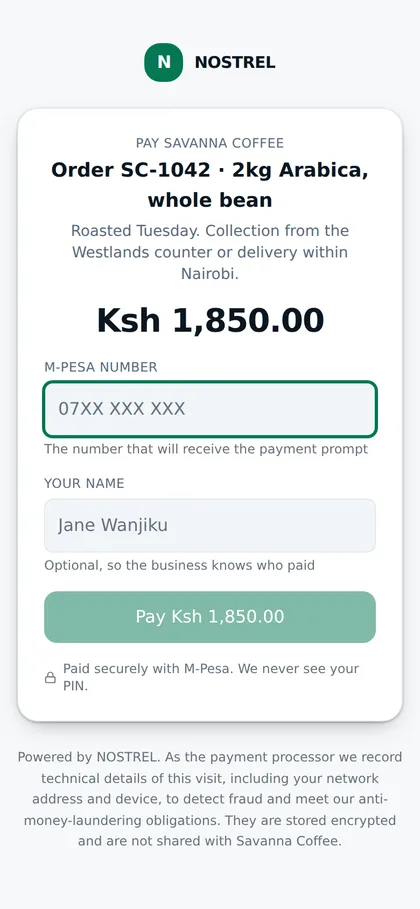
The hosted checkout, which is the only page most of your customers will ever see of us. Demonstration data.
01Four ways
One link, four shapes
They are the same thing underneath: a hosted page, an amount and a record. Which one you want depends on whether you are sending a message, issuing a document or standing behind a counter.
Payment links
A short URL with your business name, a description and an amount, or with the amount left open for the payer to fill in. Send it on WhatsApp, put it in an email signature, print it on a poster.
Disable a link without deleting it, so the payments it already took keep their history.
A QR code for the same link
Generated from the link, so there is one thing to keep correct rather than two. Stick it on a counter, a menu, a delivery note or the back of a card.
Downloads as a file you can hand to a printer at the size they ask for.
Invoices
Line items, quantities, totals and a due date, on a hosted page the customer pays from. Draft until you send it, sent until it is paid, and cancelled if you withdraw it.
There is no "overdue" status, deliberately. Overdue is sent plus a date that has passed, and storing it twice is how two screens start disagreeing.
Point of sale
Ring up a sale from a product list on a phone, take the payment, and have the sale and the payment be the same record rather than two things somebody matches up later.
Products and prices live in the console, so the person at the counter is not typing amounts.
02The payer
What the person paying actually experiences
This page is the only thing most of your customers will ever see of us, so it is designed as if the whole business depends on it, because for a shop it does.
They see your name, not ours
The page carries the business name the customer knows. We are a line at the bottom saying who processed it, because concealing that would be the wrong kind of clever.
One field that matters
A phone number. The name field is optional and labelled as optional, because every required field on a payment page is a reason to leave.
No account, ever
Nobody registers, nobody sets a password, nobody is emailed afterwards unless they asked to be. The payment is the entire interaction.
It tells them what is happening
The page watches for the outcome and says so, rather than leaving someone staring at a spinner wondering whether to pay again. Paying again is the expensive mistake.
We never see their PIN
The PIN is entered on the handset, in Safaricom's own prompt. It does not pass through this page, our servers or your servers, and the page says so where the payer can read it.
The slowest part is a person finding their phone
Worth saying plainly, because it sets the expectation for everything else. Our part of an STK push is measured in milliseconds. Then a prompt appears on a handset and somebody has to pick it up, read it and enter four digits, which takes as long as it takes.
The checkout page is built for that wait: it keeps watching, says what state the payment is in, and does not invite the payer to try again while the first attempt is still live. An impatient second attempt is the most common way a customer pays twice.
03Before you are approved
Draft everything on day one. Collect when you are verified.
Verification takes as long as it takes, and making you wait before you can even lay out your products was an obviously wrong thing we had built and have since fixed.
01
Prepare
Create links, write invoices, load your product list, set up your team. All of it is available before anyone has reviewed your documents.
02
Preview
Open your own checkout page and see exactly what a customer will see. It is marked clearly as not yet live, so nothing can be accidentally sent to a customer in that state.
03
Collect
Approval switches on collection. Nothing you prepared is lost, rebuilt, or needs re-entering. The links you made simply begin to work.
It takes about four minutes
Make an account, make a link, send it to yourself, pay yourself a shilling. That is a more useful evaluation than anything written on this page.